> ## Documentation Index
> Fetch the complete documentation index at: https://docs.kelviq.com/llms.txt
> Use this file to discover all available pages before exploring further.
# Promotions UI JS SDK
> Add purchasing power parity discounts and a localised banner to any website
The Promotions UI JS SDK automatically applies location-based discounts to prices on your page and renders a customisable banner that tells visitors about their local deal. It works with plain HTML — no framework required.
This SDK is separate from the [entitlements JS SDK](/frontend-integration/js-sdk). Use this SDK when you need PPP / country-based discount banners and price display.
***
## Installation
### 1. Add the Script
Paste this snippet just before the closing `` tag on your pricing page:
```html theme={null}
```
### 2. Initialize the SDK
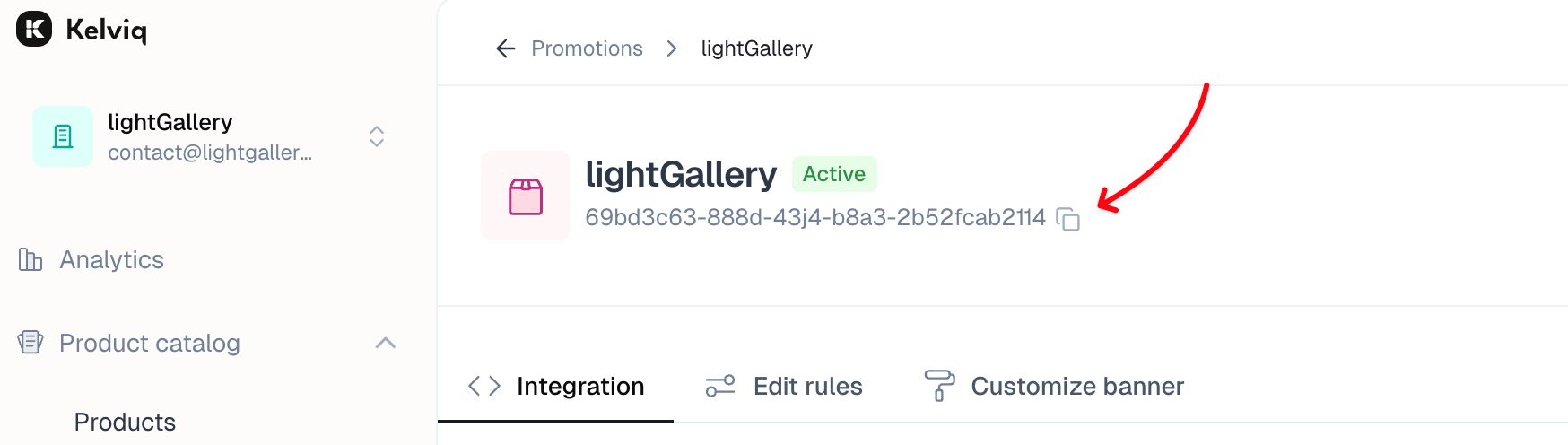
Copy your promotion ID from the promotion detail page and call `init()`:
 ```javascript theme={null}
KQPromotionUI.init({
// Replace with your promotion ID
promotionId: "YOUR_PROMOTION_ID",
// Access token can be found in the Settings -> API keys section
accessToken: "YOUR_CLIENT_ACCESS_TOKEN",
showBanner: true,
});
```
This will automatically display a discount banner if the visitor is eligible for a discount.
**Never expose your Server API Key in the browser.** Use the **Client API Key**, which is safe for client-side code. You can find both keys under **Settings → API keys** in the [Kelviq dashboard](https://app.kelviq.com/settings/api-keys).
***
## `init()` options
| Option | Type | Default | Description |
| ------------------------ | ------------------------------ | -------------- | ---------------------------------------------------------------------------------------------------------------------------- |
| `promotionId` | `string` | — | Promotion ID from the Kelviq dashboard |
| `accessToken` | `string` | — | Client API Key (Settings → API keys) |
| `showBanner` | `boolean` | `true` | Render the localised discount banner automatically |
| `environment` | `"production" \| "sandbox"` | `"production"` | Target environment |
| `baseCurrencyCode` | `string` | `"USD"` | ISO 4217 code for prices displayed on the page |
| `baseCurrencySymbol` | `string` | `"$"` | Symbol written to `data-kq-currency-symbol` elements |
| `currencyDisplay` | `"symbol" \| "code" \| "name"` | `"symbol"` | How the currency is formatted via `Intl.NumberFormat` |
| `showDecimal` | `boolean` | `false` | Include the decimal portion in formatted prices |
| `minimumDecimalDigits` | `number` | `2` | Minimum fraction digits (0–2) |
| `maximumDecimalDigits` | `number` | `2` | Maximum fraction digits (0–2) |
| `banner.*` | object | — | Customization for the discount banner |
| `banner.unStyled` | boolean | false | if true, no styling will be applied to the banner |
| `banner.addCloseIcon` | boolean | true | Control close button visibility. This setting will work only if close button is enabled from the ParityDeals banner settings |
| `banner.placement` | `top\|bottom` | 'top' | The placement of the discount banner |
| `banner.container` | string | null | The container for the discount banner |
| `banner.backgroundColor` | string | '#f0f0f0' | The background color of the discount banner |
| `banner.fontColor` | string | '#333333' | The font color of the discount banner |
| `banner.borderRadius` | string | '0px' | The border radius of the discount banner |
| `banner.fontSize` | string | '14px' | The font size of the discount banner |
***
## Auto price update
After `init()` resolves, every element with `data-kq-price` on the page is automatically updated with the discounted price for the visitor's country.
### Basic usage
```html theme={null}
```javascript theme={null}
KQPromotionUI.init({
// Replace with your promotion ID
promotionId: "YOUR_PROMOTION_ID",
// Access token can be found in the Settings -> API keys section
accessToken: "YOUR_CLIENT_ACCESS_TOKEN",
showBanner: true,
});
```
This will automatically display a discount banner if the visitor is eligible for a discount.
**Never expose your Server API Key in the browser.** Use the **Client API Key**, which is safe for client-side code. You can find both keys under **Settings → API keys** in the [Kelviq dashboard](https://app.kelviq.com/settings/api-keys).
***
## `init()` options
| Option | Type | Default | Description |
| ------------------------ | ------------------------------ | -------------- | ---------------------------------------------------------------------------------------------------------------------------- |
| `promotionId` | `string` | — | Promotion ID from the Kelviq dashboard |
| `accessToken` | `string` | — | Client API Key (Settings → API keys) |
| `showBanner` | `boolean` | `true` | Render the localised discount banner automatically |
| `environment` | `"production" \| "sandbox"` | `"production"` | Target environment |
| `baseCurrencyCode` | `string` | `"USD"` | ISO 4217 code for prices displayed on the page |
| `baseCurrencySymbol` | `string` | `"$"` | Symbol written to `data-kq-currency-symbol` elements |
| `currencyDisplay` | `"symbol" \| "code" \| "name"` | `"symbol"` | How the currency is formatted via `Intl.NumberFormat` |
| `showDecimal` | `boolean` | `false` | Include the decimal portion in formatted prices |
| `minimumDecimalDigits` | `number` | `2` | Minimum fraction digits (0–2) |
| `maximumDecimalDigits` | `number` | `2` | Maximum fraction digits (0–2) |
| `banner.*` | object | — | Customization for the discount banner |
| `banner.unStyled` | boolean | false | if true, no styling will be applied to the banner |
| `banner.addCloseIcon` | boolean | true | Control close button visibility. This setting will work only if close button is enabled from the ParityDeals banner settings |
| `banner.placement` | `top\|bottom` | 'top' | The placement of the discount banner |
| `banner.container` | string | null | The container for the discount banner |
| `banner.backgroundColor` | string | '#f0f0f0' | The background color of the discount banner |
| `banner.fontColor` | string | '#333333' | The font color of the discount banner |
| `banner.borderRadius` | string | '0px' | The border radius of the discount banner |
| `banner.fontSize` | string | '14px' | The font size of the discount banner |
***
## Auto price update
After `init()` resolves, every element with `data-kq-price` on the page is automatically updated with the discounted price for the visitor's country.
### Basic usage
```html theme={null}
```
The original-price element is hidden by default. The SDK shows it automatically when a discount is active and hides it when the visitor's country has no discount.
### Price container attributes
| Attribute | Value | Description |
| -------------------------------- | ------------------------------ | ---------------------------------------------------------------------------- |
| `data-kq-price` | `number` | Base price — the discounted value is computed and written to child elements |
| `data-kq-original-price-display` | `number` | Original (pre-discount) price; hidden when there is no active discount |
| `data-kq-rel` | `string` | Links a price element and its original-price element so they update together |
| `data-kq-show-decimal` | `"true" \| "false"` | Per-element decimal override (falls back to `showDecimal` from `init()`) |
| `data-kq-currency-display` | `"symbol" \| "code" \| "name"` | Per-element currency format |
| `data-kq-minimum-decimal-digits` | `number` | Per-element minimum fraction digits (0–2) |
| `data-kq-maximum-decimal-digits` | `number` | Per-element maximum fraction digits (0–2) |
### Sub-element attributes
Place these inside a price container to receive individual parts of the formatted price:
| Attribute | Example output |
| --------------------------------- | -------------- |
| `data-kq-currency-symbol` | `$` |
| `data-kq-price-integer` | `49` |
| `data-kq-price-decimal` | `99` |
| `data-kq-price-decimal-separator` | `.` |
| `data-kq-currency-code` | `USD` |
| `data-kq-price-formatted` | `$49.99` |
***
## JS API
All methods return Promises and require `init()` to have been called first.
### `getUpdatedPrice(price, options?)`
Computes the discounted price and returns a `PriceObject` without touching the DOM.
```javascript theme={null}
const result = await KQPromotionUI.getUpdatedPrice(100, { showDecimal: true });
console.log(result.formattedPrice); // "$80.00"
console.log(result.price); // 80
```
**Parameters**
| Parameter | Type | Description |
| --------- | ----------------- | -------------------------------------------- |
| `price` | `number` | Base price to apply the discount to |
| `options` | `Partial` | Optional overrides (same fields as `init()`) |
**Returns — `PriceObject`**
| Field | Type | Description |
| ------------------ | ------------- | ------------------------------------------------------------ |
| `price` | `number` | Final price after discount |
| `formattedPrice` | `string` | Fully formatted string, e.g. `$80.00` |
| `integerPart` | `string` | Integer portion only, e.g. `80` |
| `decimalPart` | `string` | Decimal digits only, e.g. `00` |
| `decimalSeparator` | `string` | Locale-specific separator, e.g. `.` |
| `currencySymbol` | `string` | Currency symbol, e.g. `$` |
| `currencyCode` | `string` | ISO 4217 code, e.g. `USD` |
| `apiResponse` | `PricingData` | Full API response including country, percentage, and widgets |
***
### `updatePriceElement(element, options?)`
Updates a specific DOM element with the computed discounted price. The element **must** have a `data-kq-price` attribute. All elements linked to it via `data-kq-rel` are updated as well.
```javascript theme={null}
const el = document.getElementById("pro-price");
const result = await KQPromotionUI.updatePriceElement(el, { showDecimal: true });
console.log(result.formattedPrice);
```
**Parameters**
| Parameter | Type | Description |
| --------- | ----------------- | ----------------------------------- |
| `element` | `HTMLElement` | Must have `data-kq-price` attribute |
| `options` | `Partial` | Optional overrides |
Returns a `PriceObject` (same shape as `getUpdatedPrice`).
***
### `updatePrice(configs[])`
Batch-update multiple elements, optionally rendering each with an HTML template.
```javascript theme={null}
await KQPromotionUI.updatePrice([
{
element: document.getElementById("monthly"),
price: 29,
options: { showDecimal: false },
template: "{{formattedPrice}} /mo
",
},
{
element: document.getElementById("annual"),
price: 199,
options: { showDecimal: true },
template: "{{formattedPrice}} /yr
",
},
]);
```
**Config object fields**
| Field | Type | Description |
| ---------- | ----------------- | ----------------------------------------------------------------------- |
| `element` | `HTMLElement` | Target element — its `innerHTML` is replaced with the rendered template |
| `price` | `number` | Base price |
| `options` | `Partial` | Optional overrides |
| `template` | `string` | HTML string with `{{key}}` placeholders |
**Available template variables** (any field from `PriceObject`):
`{{price}}` · `{{formattedPrice}}` · `{{integerPart}}` · `{{decimalPart}}` · `{{decimalSeparator}}` · `{{currencySymbol}}` · `{{currencyCode}}`
Returns `Promise` — one entry per config.
***
## CSS hooks
The SDK adds classes to `document.body` that you can target in your stylesheets:
| Class | Added when |
| ---------------------- | -------------------------------------------------------- |
| `kq-discount-applied` | An active discount > 0% exists for the visitor's country |
| `kq-has-parity-banner` | The discount banner has been injected into the page |
```css theme={null}
/* Show a sale badge only when a discount is active */
.sale-badge { display: none; }
body.kq-discount-applied .sale-badge { display: inline-block; }
/* Add top padding so content isn't hidden under the banner */
body.kq-has-parity-banner main { padding-top: 60px; }
```
***
## Sandbox
Set `environment: "sandbox"` to test against the Kelviq sandbox environment.
```javascript theme={null}
KQPromotionUI.init({
promotionId: "YOUR_PROMOTION_ID",
accessToken: "YOUR_CLIENT_ACCESS_TOKEN",
environment: "sandbox",
});
```
Use sandbox API keys (available under **Settings → API keys** with the Sandbox toggle enabled) so real visitor data is never affected during testing.