> ## Documentation Index
> Fetch the complete documentation index at: https://docs.kelviq.com/llms.txt
> Use this file to discover all available pages before exploring further.
# Transactions
> Audit individual payments, fees, and net earnings
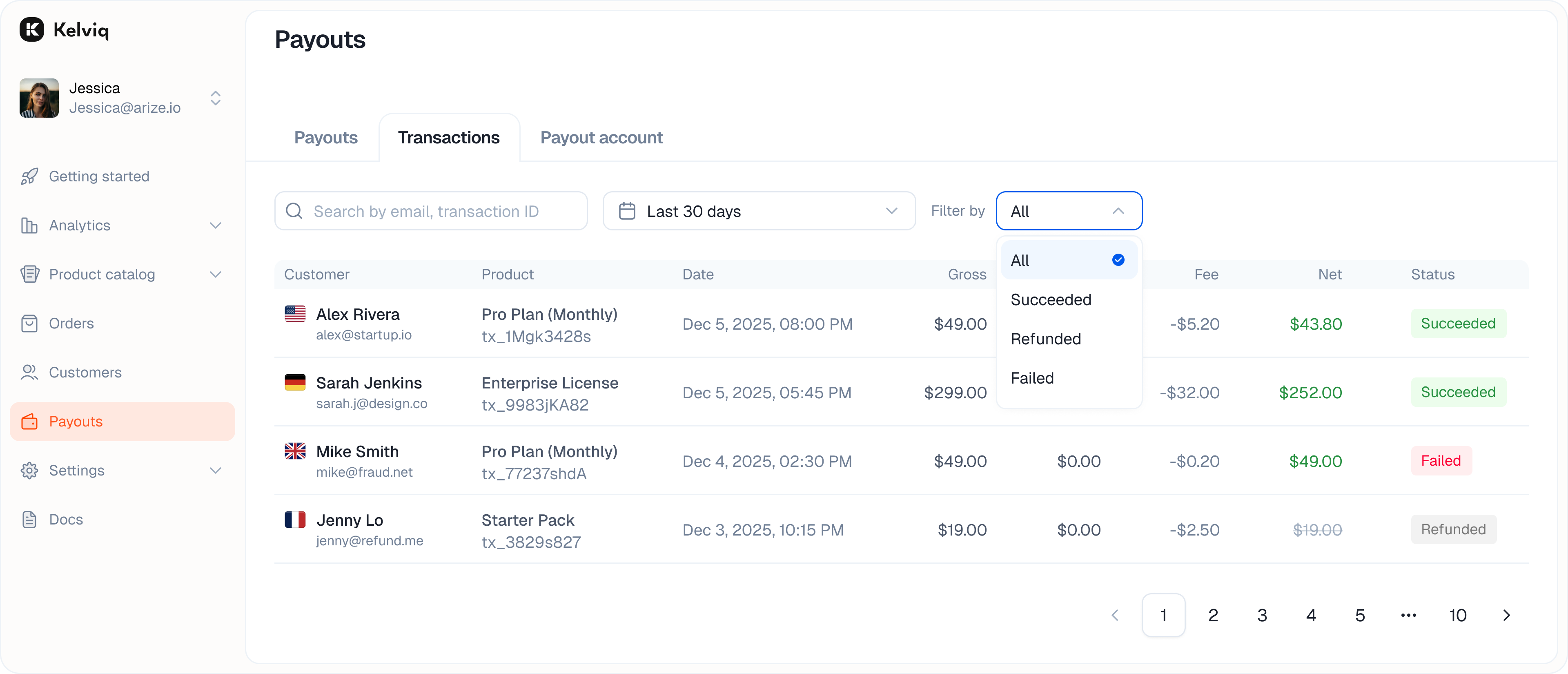
The **Transactions** tab shows successful payments, refunds, and failed payments. Use it to see what the customer paid, the fees and tax deducted, and the amount added to your balance.
 ## Filtering
You can filter the list to find specific issues.
* **Success:** Completed payments.
* **Refunded:** Money returned to customers.
* **Failed:** Declined cards or failed transfers.
## Transaction details
Click a transaction row to open its details.
* **Gross total:** The full amount charged to the customer, including tax.
* **Fee:** The combined transaction fees deducted by Kelviq.
* **Tax:** Tax collected for the transaction and excluded from your net earnings.
* **Net earnings:** The amount added to your Kelviq balance after transaction fees and tax. A separate payout fee can apply when the balance is sent to your bank.
* **Payment details:** The card or method used.
For a successful transaction:
```text theme={null}
Net = Gross - Fee - Tax
```
## How the Fee column is calculated
The **Fee** column shows one combined amount. Depending on the transaction, that amount can contain up to three components:
| Component | Rate | When it applies |
| --------------------------------------- | ------------- | ----------------------------------------------------------------------------------- |
| Base fee before \$5,000 in total volume | 2.9% + \$0.40 | Transactions processed before your organization reaches \$5,000 in cumulative sales |
| Base fee after \$5,000 in total volume | 3.5% + \$0.40 | Subsequent transactions after your organization reaches \$5,000 in cumulative sales |
| Recurring billing | +0.7% | Subscription payments and renewals |
| International card | +1.5% | Cards issued outside the United States |
Recurring and international-card fees are added to the base rate when they apply. For example, an international subscription payment processed after the \$5,000 threshold is charged 5.7% + \$0.40: 3.5% base, 0.7% recurring, and 1.5% international.
### Example from the transaction list
For a \$57.60 domestic, one-time payment processed after the \$5,000 threshold:
```text theme={null}
Fee = ($57.60 × 3.5%) + $0.40
= $2.42 after rounding
Net = $57.60 gross - $2.42 fee - $9.60 tax
= $45.58
```
The percentage is calculated from the gross customer charge. The fixed \$0.40 is added once. Kelviq rounds the final fee to the smallest unit of the transaction currency.
[See the complete fee table and more examples →](/getstarted/fees)
Payout fees are not included in the **Fee** column for a customer transaction. They apply when funds are sent to your bank account. See [Payout fees](/getstarted/fees#payout-fees).
## Filtering
You can filter the list to find specific issues.
* **Success:** Completed payments.
* **Refunded:** Money returned to customers.
* **Failed:** Declined cards or failed transfers.
## Transaction details
Click a transaction row to open its details.
* **Gross total:** The full amount charged to the customer, including tax.
* **Fee:** The combined transaction fees deducted by Kelviq.
* **Tax:** Tax collected for the transaction and excluded from your net earnings.
* **Net earnings:** The amount added to your Kelviq balance after transaction fees and tax. A separate payout fee can apply when the balance is sent to your bank.
* **Payment details:** The card or method used.
For a successful transaction:
```text theme={null}
Net = Gross - Fee - Tax
```
## How the Fee column is calculated
The **Fee** column shows one combined amount. Depending on the transaction, that amount can contain up to three components:
| Component | Rate | When it applies |
| --------------------------------------- | ------------- | ----------------------------------------------------------------------------------- |
| Base fee before \$5,000 in total volume | 2.9% + \$0.40 | Transactions processed before your organization reaches \$5,000 in cumulative sales |
| Base fee after \$5,000 in total volume | 3.5% + \$0.40 | Subsequent transactions after your organization reaches \$5,000 in cumulative sales |
| Recurring billing | +0.7% | Subscription payments and renewals |
| International card | +1.5% | Cards issued outside the United States |
Recurring and international-card fees are added to the base rate when they apply. For example, an international subscription payment processed after the \$5,000 threshold is charged 5.7% + \$0.40: 3.5% base, 0.7% recurring, and 1.5% international.
### Example from the transaction list
For a \$57.60 domestic, one-time payment processed after the \$5,000 threshold:
```text theme={null}
Fee = ($57.60 × 3.5%) + $0.40
= $2.42 after rounding
Net = $57.60 gross - $2.42 fee - $9.60 tax
= $45.58
```
The percentage is calculated from the gross customer charge. The fixed \$0.40 is added once. Kelviq rounds the final fee to the smallest unit of the transaction currency.
[See the complete fee table and more examples →](/getstarted/fees)
Payout fees are not included in the **Fee** column for a customer transaction. They apply when funds are sent to your bank account. See [Payout fees](/getstarted/fees#payout-fees).